

What Does an MSP Actually Do? (And How to Tell If You Really Have One)

A Managed Service Provider (MSP) does far more than fix computers or answer helpdesk tickets. A true MSP manages your entire IT environment—network, cybersecurity, Wi-Fi, cloud systems, VoIP, backups, and vendor coordination. If your “IT company” only reacts to problems, you don’t have managed services—you have break‑fix support. Understanding the difference can dramatically impact uptime, security, and long‑term cost.
What Is a Managed Service Provider (MSP)?
A Managed Service Provider (MSP) is a company that proactively manages a business’s IT infrastructure for a predictable monthly fee.
Unlike traditional IT support that waits for something to break, an MSP:
Monitors systems 24/7
Maintains and updates infrastructure
Protects against cybersecurity threats
Plans for growth and scalability
Takes ownership of outcomes
If you searched “What does an MSP do?” or “What is managed IT services?”, you’re likely trying to understand whether your current IT setup is truly managed—or just reactive.
Managed IT Services vs. Helpdesk Support
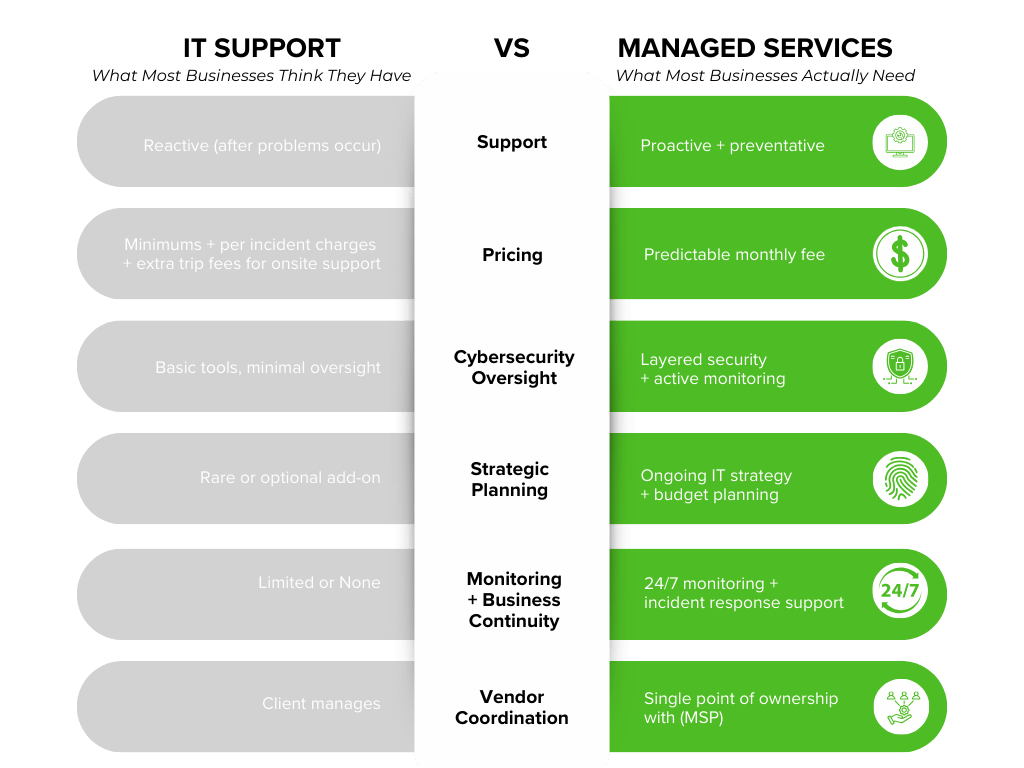
Many businesses confuse “IT support” with “managed IT services.” They are not the same.
Helpdesk / Break‑Fix IT
Responds after users report problems
Bills hourly or per incident
Focuses on devices, not systems
Rarely addresses root causes
True Managed IT Services
Prevents problems before users notice
Provides flat‑rate, predictable pricing
Manages the entire network environment
Designs systems intentionally
Owns performance, security, and reliability
If your IT company only shows up when something breaks, they are not acting as a strategic MSP.
What Services Should a Real MSP Provide?
A high‑performing Managed Service Provider typically manages:
Network Management
Firewalls and security appliances
Switches and internal infrastructure
Performance monitoring and optimization
ISP coordination and escalation
Managed Wi‑Fi
Proper coverage design
Capacity planning
Secure segmentation for staff and guests
Ongoing monitoring and firmware updates
Endpoint protection and monitoring
Patch management
Backup monitoring and testing
Email security and threat prevention
Security policy implementation
Cloud & Microsoft 365 Management
User provisioning and access control
SharePoint and Teams structure
Security configurations
VoIP & Communications Infrastructure
Quality of Service (QoS) configuration
Call quality monitoring
Vendor coordination
System optimization for growth
Strategic IT Planning
Budget forecasting
Hardware lifecycle planning
Risk assessments
Compliance alignment
An MSP’s job isn’t just to “keep things running.” It’s to design an environment that supports how your organization operates.
How Businesses Misunderstand MSPs
The term “MSP” is widely used—but not consistently delivered.
Some providers advertise managed services while still operating in a reactive model. This leads to confusion and unmet expectations.
If you’re unsure whether you truly have a managed IT provider, ask:
Are they monitoring systems proactively?
Do they take ownership when multiple vendors are involved?
Do they provide strategic guidance—or just technical fixes?
Can they clearly explain how your network is designed?
If the answer is no, you may not be receiving managed services.
Why MSPs Matter More Today Than Ever
Modern businesses depend on:
Cloud applications
Remote work
Secure data handling
Reliable VoIP communications
Constant uptime
All of this runs on one foundation: your network.
A fragmented or reactive IT approach increases:
Downtime
Cybersecurity risk
Staff frustration
Leadership distraction
A true MSP reduces those risks by owning the full ecosystem.
The Financial Impact of Real Managed Services
While managed IT services may cost more than minimal break‑fix support, they typically reduce overall expense by:
Minimizing downtime
Preventing emergency spend
Reducing cybersecurity exposure
Increasing staff productivity
Eliminating vendor finger‑pointing
The goal isn’t cheaper IT—it’s predictable, stable IT.
How SNH Technologies Defines “Managed”
At SNH Technologies, managed services mean ownership.
We don’t just answer tickets—we manage:
Managed Wi‑Fi environments
Vendor coordination with ISPs and carriers
When something isn’t working, our clients don’t wonder who to call.
They call us.
That clarity is the difference between IT support and true managed services.
Do You Actually Have an MSP?
If you’re evaluating your current provider, consider:
Are issues recurring?
Is your network documented and intentionally designed?
Do you feel confident in your cybersecurity posture?
Does your IT partner proactively suggest improvements?
Is performance predictable—or reactive?
If you’re unsure, it may be time for a second look.
A Managed Service Provider is not just a helpdesk.
A true MSP is responsible for the performance, security, and reliability of your entire technology environment.
The difference shows up in uptime, accountability, and long‑term cost.
Frequently Asked Questions About MSPs
1. What does an MSP do for a business?
A Managed Service Provider (MSP) proactively manages your IT systems, including networks, cybersecurity, Wi-Fi, cloud platforms, backups, and vendor coordination. Their goal is to prevent problems—not just fix them.
2. Is a helpdesk the same as a Managed Service Provider?
No. A helpdesk responds to issues after they occur. A true MSP monitors, maintains, and strategically manages your technology environment to reduce issues before they impact users.
3. How much do managed IT services cost?
Managed IT services typically involve a predictable monthly fee based on users, devices, and scope. While more comprehensive than break-fix support, MSPs often reduce overall cost by minimizing downtime and security risk.
4. Do small businesses need an MSP?
Yes. Small and mid-sized businesses often benefit the most from MSPs because they gain enterprise-level monitoring, cybersecurity, and planning without hiring a full internal IT department.
Ready to See What Managed Really Looks Like?
We help businesses, schools, and organizations move from reactive IT to fully managed environments.
If you’re questioning whether your current IT support is truly proactive—or just responsive—we’ll give you a clear answer.
Schedule a Managed IT Assessment and discover what changes when one team takes ownership of your technology.