

Gone Phishing: Why Your Employees Are Still the #1 Cybersecurity Target
Cybersecurity Awareness Month | Part 2 of 4
The suspicious email from a Nigerian prince isn't really the problem anymore.
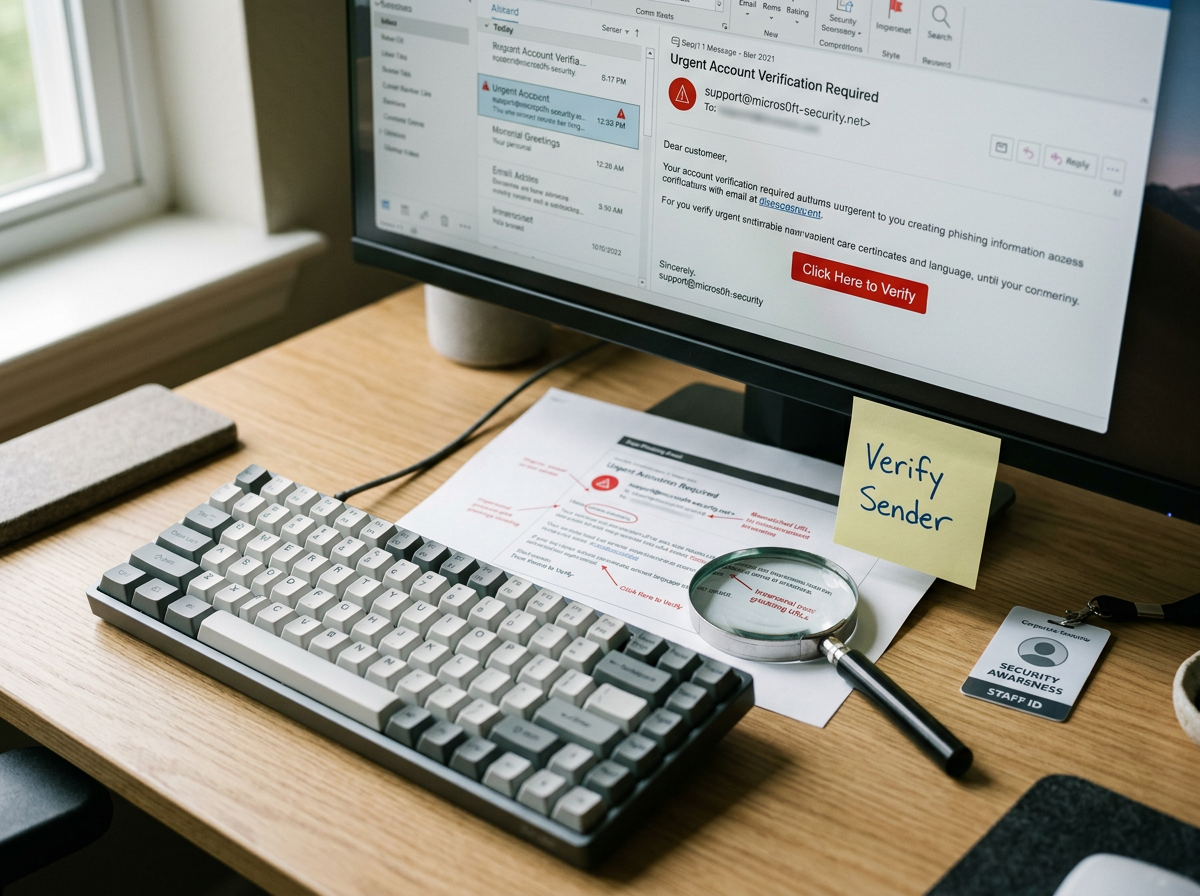
Today's phishing emails can look like they came from your CEO, your accountant, Microsoft, a vendor you've worked with for years—or even someone whose email account has already been compromised.
They can reference real projects. Use familiar language. Copy legitimate email threads. And with AI making convincing messages easier to create, spelling mistakes and awkward wording aren't the warning signs they once were.
The goal usually isn't to “hack” your firewall.
It's to convince someone inside your business to open the door.
What is phishing?
Phishing is a type of cyberattack that uses deceptive messages to convince someone to take an action they normally wouldn't.
That might mean:
Clicking a malicious link
Opening an infected attachment
Entering a password into a fake login page
Approving an unexpected MFA request
Sending sensitive information
Changing banking information
Paying a fraudulent invoice
Email is the most familiar version, but phishing can also arrive through text messages, social media, collaboration platforms and even phone calls.
The technology changes.
The basic strategy doesn't: make the request believable enough that someone acts before they question it.
Why do cybercriminals target employees?
Because people legitimately need access to things.
Your employees can open files, access Microsoft 365, communicate with vendors, approve invoices, reset passwords and interact with systems that outsiders can't.
Attackers know this.
Instead of trying to break through every technical security control protecting a business, it can be easier to persuade someone with legitimate access to do something for them.
That doesn't mean employees are your cybersecurity problem.
It means employees are part of your security perimeter.
And they need both training and technology protecting them.
Phishing looks a lot better than it used to
The classic advice was easy:
Look for bad grammar. Strange formatting. Misspelled company names. Weird email addresses.
Those are still worth checking.
But they aren't enough.
Modern phishing messages can be extremely polished. Generative AI makes it inexpensive to create professional-looking messages with natural language, correct grammar and convincing context.
Attackers can also impersonate executives, coworkers and vendors.
A message might say:
“I'm heading into a meeting. Can you send me our current bank information?”
Or:
“We recently changed banks. Please use the attached ACH instructions for this month's invoice.”
Or simply:
“You have a secure document waiting. Sign in to Microsoft 365 to review it.”
Nothing about those requests is inherently absurd.
That's exactly why they work.
Business email compromise can be even harder to spot
One of the more dangerous scenarios isn't a fake email account.
It's a real one that's already been compromised.
Business email compromise, commonly called BEC, can allow an attacker to send messages from a legitimate account or use information from a compromised mailbox to create highly convincing impersonation attempts.
Imagine receiving an email from a vendor you've worked with for three years.
The name is right.
The email address is right.
The signature is right.
The invoice looks normal.
But the banking instructions changed.
That isn't something an employee can reliably identify because the font looked funny.
Businesses need procedures for verifying high-risk requests outside the email conversation itself.
The five-second rule for suspicious email
Before clicking, opening, paying or changing anything, ask:
Was I expecting this?
That's one of the simplest habits a business can teach.
Then look at the context.
Does the request make sense?
An email can come from a familiar person and still contain an unusual request.
Is it creating urgency?
“Need this immediately,” “payment overdue,” and “account will be suspended” are designed to reduce the amount of time you spend thinking.
Is it asking you to sign in?
Instead of using the link in the message, navigate directly to the service you normally use.
Is money involved?
Changes to ACH instructions, wire transfers, payroll information or payment destinations deserve additional verification.
Is the request unusual?
If your CEO has never asked you to buy twelve gift cards before, today probably isn't the day to start.
“I'll just call them and check.”
Good.
But there's an important detail:
Don't use the contact information provided in the suspicious message.
If an email supposedly from a vendor asks you to change banking information, verify it using a phone number you already have on file or obtain independently.
If your boss asks for something unusual, call or message them using your normal method.
You're trying to create a second, independent verification channel.
Calling the phone number the attacker conveniently included in the fraudulent email doesn't accomplish much.
MFA helps. But, MFA isn't magic either
Multifactor authentication is one of the most important protections businesses can deploy.
If an attacker steals a password, MFA can provide another barrier before that person can access the account.
But attackers have adapted.
Employees may receive repeated authentication prompts hoping they'll eventually approve one. Fake login pages may attempt to capture authentication information. More sophisticated attacks can target authenticated sessions rather than passwords alone.
So the lesson shouldn't be:
“We have MFA, so we're safe.”
It should be:
“Why am I receiving an MFA request when I'm not trying to log in?”
An unexpected authentication prompt should be treated as a warning, not an inconvenience to approve.
Cybersecurity training shouldn't be an annual PowerPoint
Security awareness training matters.
But employees aren't going to remember a 45-minute presentation from eight months ago when a convincing invoice lands in their inbox at 4:52 on Friday afternoon.
Effective security awareness is ongoing.
Short training, phishing simulations, reminders and clear procedures help employees build habits instead of memorizing cybersecurity vocabulary.
More importantly, employees need to know what to do when they're unsure.
The safest organizational culture isn't one where nobody ever clicks something suspicious.
It's one where an employee feels comfortable saying:
“I clicked this and now I think something's wrong.”
Immediately.
That gives your IT or cybersecurity team a chance to respond before a small incident becomes a much larger one.
Technology should protect your employees too
Training shouldn't be the only thing standing between your business and a phishing attack.
Businesses should combine employee awareness with technical controls such as:
Email security: Filtering malicious messages, attachments, impersonation attempts and suspicious links before they reach the inbox.
Multifactor authentication: Adding another barrier when credentials are stolen.
Identity and access controls: Limiting what accounts can access and applying stronger protections to privileged users.
Endpoint security: Detecting suspicious activity if something malicious reaches a computer.
Monitoring: Identifying unusual logins, account activity or other behavior that may indicate compromise.
Patch management: Reducing vulnerabilities attackers can exploit after gaining an initial foothold.
This is why cybersecurity works in layers.
If the email filter misses something, the employee may recognize it.
If the employee clicks it, another security control may stop it.
If credentials are compromised, MFA may prevent access.
If an attacker does gain access, monitoring may detect the activity.
No single layer has to be perfect if the layers work together.
What should an employee do after clicking a phishing email?
First: tell someone.
Don't wait to see what happens.
Don't quietly close the browser and hope everything is fine.
And don't spend 20 minutes trying to fix it yourself before contacting IT.
If you entered a password, approved an MFA request, opened an attachment or downloaded something suspicious, tell your IT or cybersecurity provider exactly what happened.
The response may include resetting credentials, terminating active sessions, isolating a device, reviewing account activity or investigating whether additional systems were affected.
The faster your security team knows, the faster they can respond.
A quick phishing check for Florida Panhandle businesses
Ask your team these questions:
Would employees recognize an unexpected MFA prompt as suspicious?
Do employees know exactly how to report a suspicious email?
Do you independently verify changes to vendor banking information?
Are employees trained to verify unusual financial requests?
Is MFA enabled on Microsoft 365, Google Workspace and other critical applications?
Does someone monitor suspicious login and security activity?
If an employee reported a compromised account right now, does someone know what happens next?
If the answer to that last question is unclear, that's worth fixing before you need the answer.
Good people still click bad links
Cybersecurity awareness isn't about turning every employee into a cybersecurity analyst.
And it shouldn't be about scaring people into never opening another email.
Your employees have jobs to do.
The goal is to give them enough knowledge to recognize when something feels unusual, simple procedures for verifying high-risk requests and an easy way to get help when they're unsure.
Then you put technology around them that assumes humans occasionally make mistakes.
Because they will.
So will IT professionals.
Good cybersecurity plans for that.
At SNH TECHNOLOGIES, we help businesses and organizations across Pensacola, Fort Walton Beach, Destin, Santa Rosa Beach, Panama City and the Florida Panhandle build cybersecurity strategies that combine technology, monitoring and people.
Don't let IT scare you. And definitely don't let a convincing email do it either.

Frequently Asked Questions
What is the most common sign of a phishing email?
There isn't one universal sign. Unexpected requests, unusual urgency, login links, attachments, changes to payment information and requests for sensitive information should all prompt additional scrutiny.
Can phishing emails look completely legitimate?
Yes. Phishing messages can imitate legitimate companies and people, and compromised email accounts can make fraudulent communications particularly convincing. Businesses shouldn't rely solely on appearance, grammar or sender names to determine whether a message is legitimate.
Does MFA stop phishing?
MFA significantly improves account security, but it doesn't eliminate phishing risk. Businesses still need email security, employee awareness, identity protections, monitoring and procedures for responding to suspicious activity.
What should I do if an employee clicks a phishing link?
Contact your IT or cybersecurity provider immediately and explain exactly what happened, particularly if the employee entered credentials, approved an authentication request, opened an attachment or downloaded a file.
How can businesses prevent phishing attacks?
There is no single control that prevents every phishing attack. A layered approach can include email filtering, MFA, endpoint security, identity and access controls, monitoring, employee training and procedures for independently verifying sensitive or financial requests.
Next in our Cybersecurity Awareness Month series:
Backups Aren't Boring When Everything Is on Fire: A Ransomware Survival Guide
SNH TECHNOLOGIES provides managed IT, cybersecurity, backup and disaster recovery services to businesses and organizations throughout Northwest Florida and the Florida Panhandle. If you're not sure what would happen if your systems went down today, that's a question worth answering before you need to.